(Meta Description)
Struggling to decide between a wall mount or top mount for your HMI support arm system? Learn the pros, cons, and installation requirements for both configurations.
Introduction
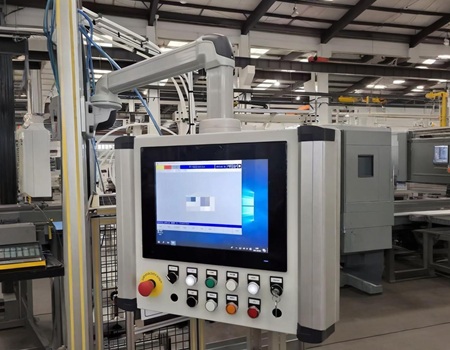
When integrating an HMI (Human-Machine Interface) support arm system into your industrial machinery, selecting the right components is only half the battle. The other half is choosing the correct mounting base. The mounting base dictates how the operator interacts with the control box, the range of motion of the arm, and even the maximum load capacity.
At JDF-FA, we offer modular solutions for various installation environments. Today, we break down the two most common configurations: Wall Mounts (Horizontal) and Top Mounts.
1. Wall Mounts (Horizontal Wall Mount / Vertical Wall Seat)
Wall mounts are designed for situations where a connection to the floor is not possible, or when a high connection point on the machine side is desired.
How it works: Attached to a vertical surface (like the side of a CNC machine or a structural pillar), it allows the support arm to extend horizontally toward the operator.
Best for: Standard machine enclosures, side-wall installations, and production lines where machines are placed side-by-side.
Advantages: Easy access for installation and maintenance. It keeps the top of the machine clear for other components (like exhaust systems or warning lights).
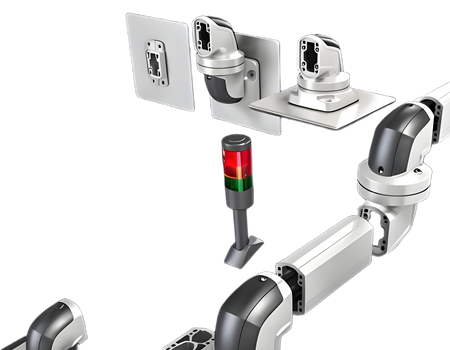
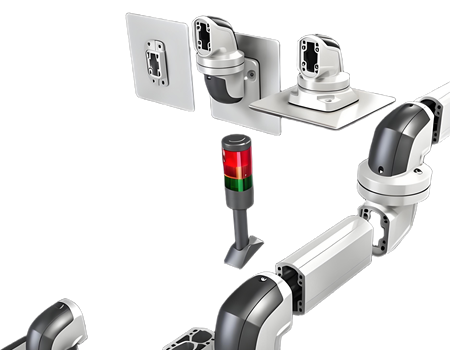
JDF-FA Solutions: Our 50-65-260 (Horizontal Wall Mount) and 60-95-360 models are ideal choices. They allow the arm to rotate smoothly up to 320°.
2. Top Mounts (Top Seat)
Top mounts are engineered for high connection points, suspending the arm from above.
How it works: The base is bolted directly to the top surface (ceiling of the machine casing or an overhead gantry). The support arm hangs vertically downwards before turning horizontally.
Best for: Large CNC machines, robotic cells, or situations where the machine's side walls are occupied or inaccessible.
Advantages: It maximizes the operator's workspace on the floor and keeps the side of the machine free. It often provides a more ergonomic downward viewing angle for the operator.
JDF-FA Solutions: Our 50-65-220 (Top Seat) and 75-110-520 models offer robust stability. The top seat design also allows the arm to rotate 320° for flexible positioning.
3. Crucial Considerations Before You Choose
Don't just pick based on looks. Consider these engineering factors:
The Leverage Effect: A top mount suspends the weight differently than a wall mount. The longer the vertical drop, the more stress is placed on the joints. Always check the load-length curve for your specific series (5065, 6095, or 75110).
Cable Management: Our aluminum profiles feature hollow channels. If you choose a Top Mount, ensure your cables can easily route from the overhead structure down through the arm to the HMI enclosure. JDF-FA provides comprehensive cable protection edge strips for all configurations.
Operator Ergonomics: If the operator needs to stand and look slightly down at the screen, a Top Mount might be better. If they are seated, a Wall Mount at eye level is usually preferred.
Conclusion
Whether you choose a Horizontal Wall Mount for side access or a Top Seat for overhead suspension, JDF-FA provides high-quality die-cast aluminum bases that guarantee stability. All our bases feature simple adjustment methods and can be combined with our 50-65, 60-95, and 75-110 arm profiles.
Need help designing your workstation layout? [Contact JDF-FA engineering team] for 3D CAD drawings and expert advice.